Actually, if you really need to type Spanish accent marks on a regular basis, then the best thing to do is relax, take a deep breath, and install a Spanish keyboard layout on your computer.
But perhaps you just need to type some words now and then, and you do not want to wrestle with your system configuration (or simply cannot). Then I have two different solutions for you:
1. My “Spanish Accents Generator” bookmarklet
What is a bookmarklet? It is nothing but a regular link that, instead of a web address, contains a little script that does some useful stuff. As it works within the browser, there is no need to download or install anything into your computer.
For example, this link, when clicked, runs a simple and pointless script that asks you your name and then friendly greets you.
The “Spanish Accents Generator Yada-Yada Pro 2007″ bookmarklet (just kidding) will help you to easily get Spanish accent marks (and punctuation marks and symbols), regardless of what kind of keyboard or computer you are using:
Its usage is very simple:
- Click on the above button. A window will appear, asking you to type something.
- Type, for example, this:
!’No averigu:e’ do’nde esta’ la sen’ora D_a Mari’a O”Donnell! ?’NO SUBIO’ AL 2_o PISO?
. - Press Enter or click OK. A new window will pop up containing the same text you typed, but with any apostrophes magically transformed into real Spanish accent marks!
- With your mouse, select the resulting text and copy it to the clipboard. You can do it by pressing the key combination CTRL-C (if you are using a PC) or Command-C (if you got a Mac), or by means of the contextual menu (usually right-clicking on the selection).
- Paste the copied text wherever you need it (again, with the key combination CTRL-V/Command-V, or making use of the context menu).
These are the codes which are converted into accents or symbols:
| Letter/Symbol | Code |
|---|---|
| á | a’ |
| Á | A’ |
| é | e’ |
| É | E’ |
| í | i’ |
| Í | I’ |
| ó | o’ |
| Ó | O’ |
| ú | u’ |
| Ú | U’ |
| ü | u: |
| Ü | U: |
| ñ | n’ |
| Ñ | N’ |
| ¡ | !’ |
| ¿ | ?’ |
| ª | _a |
| º | _o |
| ‘ | ” |
Another great advantage of bookmarklets is that, like any other kind of link, you can save them to your “favorites”. That way you will be able to use them again at any time, even when you are not online. Simply drag it onto your favorites/bookmarks toolbar (or right-click on it and select “Add to favorites…”), and that’s all: it’s yours forever!
2. Typing Spanish Accent Marks by means of HTML character codes
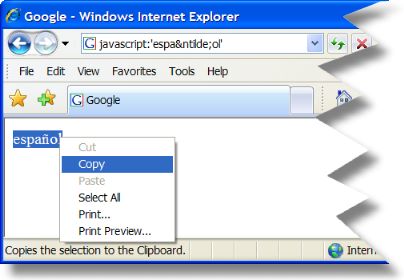
In case of emergency, there is a little trick you can use: open your browser, go to any web page, and type the following code into the address bar (replacing the http://www.whatever…):
javascript:'español'
You will get the word “español”, which, again, you can select, copy and paste.
These are the codes that represent the Spanish accented letters and other symbols:
| Letter/Symbol | Code |
|---|---|
| á | á |
| Á | Á |
| é | é |
| É | É |
| í | í |
| Í | Í |
| ó | ó |
| Ó | Ó |
| ú | ú |
| Ú | Ú |
| ü | ü |
| Ü | Ü |
| ñ | ñ |
| Ñ | Ñ |
| ¡ | ¡ |
| ¿ | ¿ |
| ª | ª |
| º | º |
Employing Notepad for longer texts
If you are going to type long texts, I recommend you to use Notepad (or your preferred text editor):
- Open Notepad and type the text with HTML codes.
- Save it as, say, accents.txt
- Rename the file to accents.html (if you use Windows, you may need to configure your pc to show filename extensions).
- Double-click the file to open it in your browser.
Tell me
I hope you have found these little tricks useful. Their main advantages are that you can use them on any computer (PC, laptop, Windows, Mac, Linux, or whatever) and that you won’t need to wrestle with your keyboard configuration, word processor, or to memorize obscure “ASCII codes”.
As always, please, feel free to drop any comments. Did the bookmarklet work fine for you? Could it be improved somehow? Do you know other, possibly better, methods? Is my English terrible? 😉
Other resources about typing Spanish accents
- Wikipedia article about Accent Marks.
- Spanish Accent Codes at Penn State’s
Information Technology Services
.

January 9, 2009
El Tiempo del verano de Nuestras Vidas, Nuestras Vidas
what does that mean in english?
January 9, 2009
becky, I would translate it as: “summer time of our lives, our lives”, How poetic! But “tiempo” can also mean “weather”, so it could be “summer weather”. It depends on what you mean. Cheers!
January 21, 2009
i really learned a lot thanks
January 21, 2009
no did doesnt tiempo means time, i am mexican and i know more than you OK!!!!!!!!!!!!!!!!!!!
January 22, 2009
Yes, “tiempo” generally means “time”, for another meanings read this:
http://www.wordreference.com/es/en/translation.asp?spen=tiempo
Of course there can be some minor differences between countries. I am from Spain. 🙂
January 25, 2009
thanks this really helped so i could get mi paper done! thanks!!!
January 25, 2009
You’re very welcome! Good luck with your paper! 🙂
August 4, 2010
how old are you
October 23, 2010
Gracias!
January 11, 2012
thxz Gracias! i love this thing ur helping me get my paper done <3333333333
January 12, 2012
You’re very welcome, Victoria! 🙂
February 29, 2012
Hola Edu,
Tengo una problema con mi teclado, quando yo quiero tecliar el accent en mi ordenador yo solo cogo comas. Antes mi ordenador funciona bien con estas symbolos y ahora no! No se que yo puedo hacer!
Gracias,
Donal
March 8, 2012
So, In Fact it is a question of: “Did You Hear Me”,….. But Polite-one!… Are You Listening……are you alive/sombre/normal/fine!?
But how come the “Tiempo”, in scandinavia, is considered as a Speed,…. meaning…. Higher Tiempo In Music?
March 8, 2012
Would like to enhange my understanding of all Spanish Speaking Countries, All-Around the World….. As well as better understanding my English.
July 15, 2015
The ‘Type Spanish Accents’ bookmarklet didn’t work for me – when I clicked on it I didn’t get the window asking me to type something. I checked my Firefox settings and javascript is enabled. Tnanks for your efforts!
July 18, 2015
Hi, Paul. I tried it with the last version of Firefox for Mac (39), and it works fine. Have you tried with another browser, like Chrome, etc.?
April 2, 2018
Guys, why don’t you teach the easiest of all ways to do it? On my Keyboard if I press “Alt+ş” I can type “óíúé” and if I press “Alt+ü” I can type “tilde”: ñ or õ